Tools
Introduction
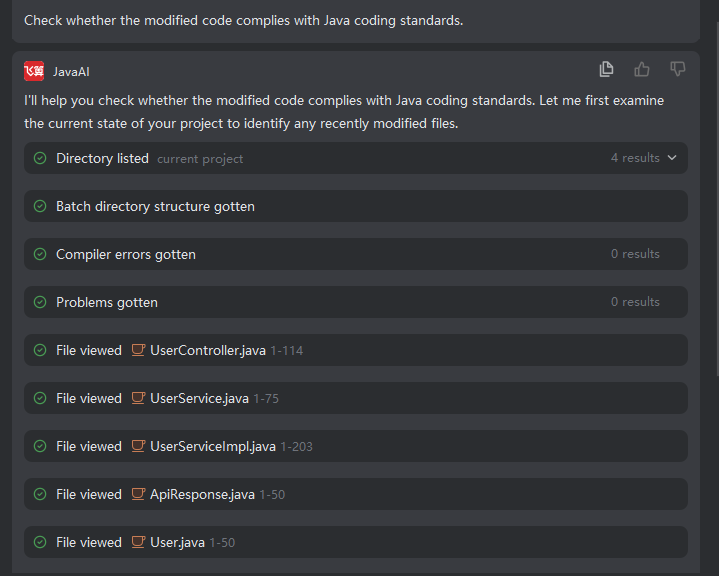
The intelligent agent provides more than ten programming tools for the agent to use, including file search, file reading, directory reading, semantic symbol retrieval within the project, file modification, error acquisition, terminal execution, etc. During the process of using tools, the agent does not require developer confirmation or intervention, can execute corresponding tools by itself, and output the results after executing corresponding tools. You can also let the agent execute which tool to complete what demand by describing.
Tool Details are as follows
| Name | Description |
|---|---|
| Retrieve Repository | Retrieve relevant file snippets (including code) from the code repository (RAG vector database) based on the input description, and return the relevant search results. |
| Search Files | Search for files within the current project and return the relevant search results. |
| Find Code | Search for code and return the relevant search results. |
| Retrieve Symbols | Retrieve symbols within the current project. |
| View Directory | Search and view the project directory structure within the current project. |
| Modify File | Modify a specific code file. |
| View File | View the content of a specific code file. |
| Run Command | Execute terminal commands. |
| Read | View the content of a file, including code. |
| Get Terminal Output | Obtain the terminal output after running a command. |
| Get Issues | Retrieve code issues within the current project (content from the Problems window). |
| Create File | Create the file directly if it does not exist; overwrite the file content directly if it exists. |
| Create Memory | Create memories related to the requirements raised by the developer. |
| Get URL Content | Retrieve the content of a specified URL. |
| Get Project Compilation Errors | Obtain error information after project compilation. |
| Batch Recursive Directory Retrieval | Retrieve the current project's directory structure (e.g., tree structure) in batches. |
| Search and Replace File | Replace the string content that needs to be modified in a file. |
| Batch Search and Replace Files | Batch replace the string content that needs to be modified in files. |
| Batch Directory Retrieval | Recursively traverse directories in batches and return the results in a directory tree structure. |
| Read File Tail | Read the tail of a file and return the content of the corresponding number of lines from the end. |
| Execute File Operations | Perform file system operations such as move, rename, copy, and delete. |
| Clarify Question | User-defined questions and answers. |
| Subtask | Execute a subtask. |
| Query Subtask Results | Query subtask results in the background. |
| Add Plan | Add plan content. |
| Update Plan | Update plan content. |
| Retrieve Rules | Retrieve rules and return the corresponding rule content. |
| Retrieve Skills | Retrieve skills and return the corresponding skill content. |
| Create Plan | Create a task plan. |
| Execute Plan | Execute the task plan. |
Explanation: Expand results, click folder or file, will automatically locate to the corresponding position in the project structure on the left side. Among them, run command/get URL content, these two tools require your confirmation before execution, other tools will execute automatically.